
Creator-Grade Performance Picks
Let’s be real, editing videos or designing graphics on an average laptop is painful.
Dropped frames in Premiere Pro.
Lag in Photoshop when working with large files.
Rendering that takes forever.
If you’re a video editor, graphic designer, or content creator, your laptop isn’t just a tool, it’s literally your production studio.
And in 2026, the difference between a “good” laptop and the “right” laptop comes down to how well it handles real creative workloads, timeline scrubbing, 4K exports, color grading, layers, effects, and multitasking.
In this guide, we’re not just listing specs. We’re breaking down the best laptops for video editing and graphic design in India, based on how they perform in actual creative workflows, so you can choose a machine that saves time, not wastes it.
What You’ll Find in This Blog
• Laptops tested for real editing and design workflows
• Which laptops handle 4K editing smoothly
• Best machines for Adobe Premiere Pro, Photoshop, After Effects
• Performance vs portability breakdown
• Pros & cons from a creator’s perspective
• Clear recommendations based on your editing style
Buying Guide: What Actually Matters for Creators
Forget marketing specs, here’s what truly impacts your workflow.
1. CPU + GPU Combination (Your Rendering Speed)
For editing and design:
• Apple M-series chips → Best optimization
• Intel HX processors → Strong raw power
• Ryzen 7 + GPU → Great balance
GPU becomes critical for:
• After Effects
• DaVinci Resolve
• 3D work
2. Display Quality (Underrated but Critical)
You need:
• Accurate colors (sRGB / DCI-P3)
• Good brightness
• High resolution
Otherwise, your final output won’t match what you see.
3. RAM (Timeline Smoothness Depends on This)
• Minimum: 16GB
• Recommended: 32GB for heavy editing
4. Storage Speed
• SSD is mandatory
• 512GB minimum
Faster storage = faster previews and exports.
5. Thermal Performance
Rendering = heat.
Better cooling = sustained performance without throttling.
List of Best Laptops for Video Editing & Graphic Design
- MacBook Air (2025) – M4 Chip
- MacBook Pro (2025) – M5 Chip
- ASUS TUF Gaming A15 – Ryzen 7
- Dell G15-5530 – Intel i5 HX
- Lenovo LOQ 2024 – Intel i5 HX
1. Apple MacBook Air (2025) – M4 Chip
Short Overview

- SPEED OF LIGHTNESS — MacBook Air with the M4 chip lets you blaze through work and play. With Apple Intelligence,* up to …
- SUPERCHARGED BY M4 — The Apple M4 chip brings even more speed and fluidity to everything you do, like working between mu…
- BUILT FOR APPLE INTELLIGENCE — Apple Intelligence is the personal intelligence system that helps you write, express your…
The MacBook Air M4 is one of those laptops that surprises you. On paper, it doesn’t look like a “heavy editing machine”, but in real-world use, it performs incredibly well for most creators.
For tasks like YouTube editing, social media content, Photoshop, and light 4K editing, this machine feels smooth, fast, and silent. Apple’s optimization with Final Cut Pro and even Premiere Pro makes timelines fluid and exports faster than expected.
The biggest advantage? Zero noise and insane battery life. You can literally edit a full video in a café without worrying about charging or fan noise. However, if your workflow involves heavy After Effects or complex timelines, you might hit its limits.
Perfect for creators who value portability + efficiency over raw brute power.
Key Specifications
• Brand: Apple
• Model: MacBook Air 2025
• Display: 13-inch Retina
• Processor: Apple M4 chip
• RAM: 16GB
• Storage: 512GB SSD
• Battery Life: Up to 15 hours
• Weight: ~1.2 kg
• Special Features: Fanless design, macOS optimization
Why To Buy?
A perfect lightweight editing machine for creators who edit anywhere, anytime.
2. Apple MacBook Pro (2025) – M5 Chip
Short Overview
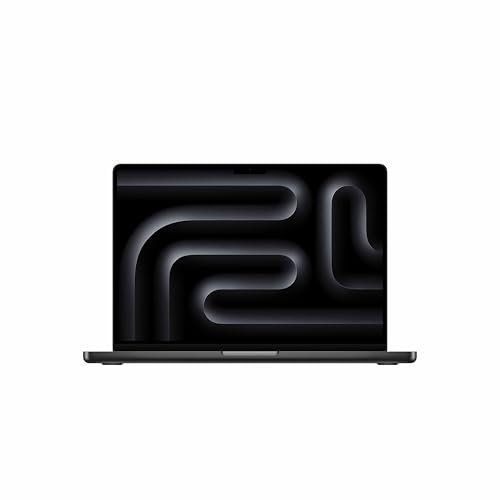
- SUPERCHARGED BY M5 — The 14″ MacBook Pro with M5 brings next-generation speed and powerful on-device AI to personal, pro…
- HAPPILY EVER FASTER — Along with its faster CPU and unified memory, M5 features a more powerful GPU with a Neural Accele…
- BUILT FOR APPLE INTELLIGENCE — Apple Intelligence is the personal intelligence system that helps you write, express your…
If the MacBook Air is efficient, the MacBook Pro M5 is a beast.
This laptop is built for serious creators, people working with 4K/8K footage, complex timelines, color grading, and heavy After Effects projects.
The M5 chip delivers insane rendering speeds, smooth timeline playback, and unmatched efficiency. You can stack effects, layers, and transitions, and it still holds up. The display is another major highlight. It’s one of the best panels available for color-critical work.
Simply put, this laptop is not just for editing, it’s for professional production workflows.
Key Specifications
• Brand: Apple
• Model: MacBook Pro 2025
• Display: High-resolution Retina (Pro display)
• Processor: Apple M5 chip
• RAM: 16GB / 32GB
• Storage: 512GB+ SSD
• Battery Life: 12–14 hours
• Weight: ~1.6 kg
• Special Features: Pro-grade display, powerful GPU
Why To Buy?
A no-compromise laptop for professional video editors and designers.
3. ASUS TUF Gaming A15 – Ryzen 7 7435HS
Short Overview
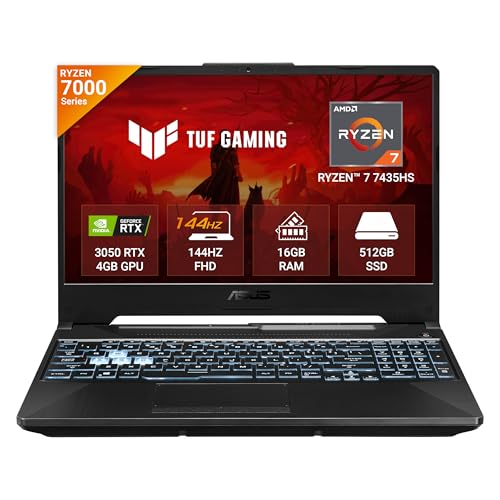
- Processor, Memory & Storage : AMD Ryzen 7 7435HS Mobile Processor 3.1GHz (20MB Cache, up to 4.5 GHz, 8 cores, 16 Threads…
- Operating System & Software : Windows 11 Home | 1-month trial for new Microsoft 365 customers. Credit card required | Xb…
- Display & Graphics : 15.6-inch (39.6 cm), FHD (1920 x 1080) 16:9, 144Hz Refresh Rate, 250nits Brightness, Anti-glare dis…
The ASUS TUF A15 is where raw power meets affordability.
Unlike ultrabooks, this machine brings serious CPU + GPU combination, making it suitable for creators who work with heavy timelines, effects, and even 3D tools. It performs especially well in Premiere Pro, Blender, and DaVinci Resolve, thanks to its dedicated GPU.
Yes, it’s bulky. Yes, it’s not as premium as MacBooks. But when it comes to price-to-performance ratio, it’s hard to beat.
Key Specifications
• Brand: ASUS
• Model: TUF A15
• Display: 15.6-inch Full HD 144Hz
• Processor: Ryzen 7 7435HS
• Graphics: Dedicated GPU
• RAM: 16GB
• Storage: 512GB SSD
• Battery Life: 6-8 hours
• Weight: ~2.3 kg
• Special Features: Strong cooling
Why To Buy?
A budget-friendly powerhouse for creators who need raw performance.
4. Dell G15-5530 – Intel i5 13450HX
Short Overview
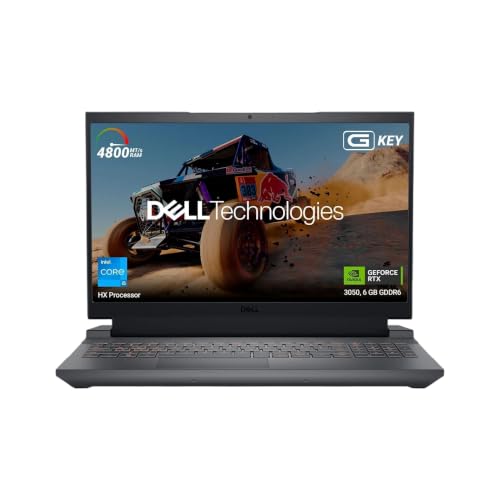
- SMOOTH VISUALS: Experience immersive gaming with the 15.6-inch FHD display and 120Hz refresh rate
- POWERFUL PERFORMANCE: Run demanding games with ease with the 13th Gen Intel Core i5-13450HX processor
- ADVANCED GRAPHICS: Enjoy superior visuals with the NVIDIA GeForce RTX 3050 GPU and 6 GB GDDR6 memory
The Dell G15 is built like a tank, and performs like one too.
With an Intel HX processor, it delivers strong performance for rendering, exporting, and multitasking. This laptop is ideal for creators who prefer Windows-based workflows and need stable performance for long editing sessions.
It doesn’t try to be slim or stylish, it focuses on getting the job done.
Key Specifications
• Brand: Dell
• Model: G15-5530
• Display: 15.6-inch Full HD
• Processor: Intel i5-13450HX
• Graphics: NVIDIA GPU
• RAM: 16GB
• Storage: 512GB SSD
• Battery Life: 6–7 hours
• Weight: ~2.5 kg
• Special Features: High-performance CPU
Why To Buy?
A reliable workhorse for creators who need consistent performance.
5. Lenovo LOQ 2024 – Intel i5-13450HX
Short Overview

- Processor: Intel Core i5-13450HX | Speed: 2.4GHz (Base) – 4.6GHz (Max) | 10 Cores | 16 Threads | 20MB Cache
- Display: 15.6″ FHD (1920×1080) IPS Technology | 144 Hz Refresh Rate | 100pct. sRGB |Brightness: 300Nits Anti-glare || Co…
- Memory: 16GB RAM DDR5-4800 | Storage: 512GB SSD (Expandable upto 1TB)
The Lenovo LOQ 2024 feels like a refined version of budget gaming laptops, but optimised for productivity and creative work.
It balances performance, thermals, and usability really well, making it suitable for creators who want stable performance without going premium. It handles editing, multitasking, and design tools comfortably, and doesn’t throttle easily.
Key Specifications
• Brand: Lenovo
• Model: LOQ 2024
• Display: 15.6-inch Full HD
• Processor: Intel i5-13450HX
• Graphics: NVIDIA GPU
• RAM: 16GB
• Storage: 512GB SSD
• Battery Life: ~6 hours
• Weight: ~2.4 kg
• Special Features: Balanced thermals
Why To Buy?
A balanced editing laptop that gets the job done without unnecessary compromises.
Comparison Summary
| Laptop | Strength | Editing Level | Portability | Ideal For |
| MacBook Air M4 | Efficiency | Medium | High | YouTubers |
| MacBook Pro M5 | Power | High | Medium | Professionals |
| ASUS TUF A15 | GPU power | High | Low | Budget creators |
| Dell G15 | Stability | High | Low | Long sessions |
| Lenovo LOQ | Balance | Medium-High | Low | Freelancers |
Final Verdict
Choosing the best laptop for video editing and graphic design in India depends on your workflow.
Best Overall: MacBook Pro M5
Unmatched performance for professional creators.
Best for Portability: MacBook Air M4
Perfect for editing on the go.
Best Budget Performance: ASUS TUF A15
Maximum power for the price.
Best Reliable Workhorse: Dell G15
Consistent performance for long editing sessions.
Best Balanced Option: Lenovo LOQ
Great mix of performance and value.